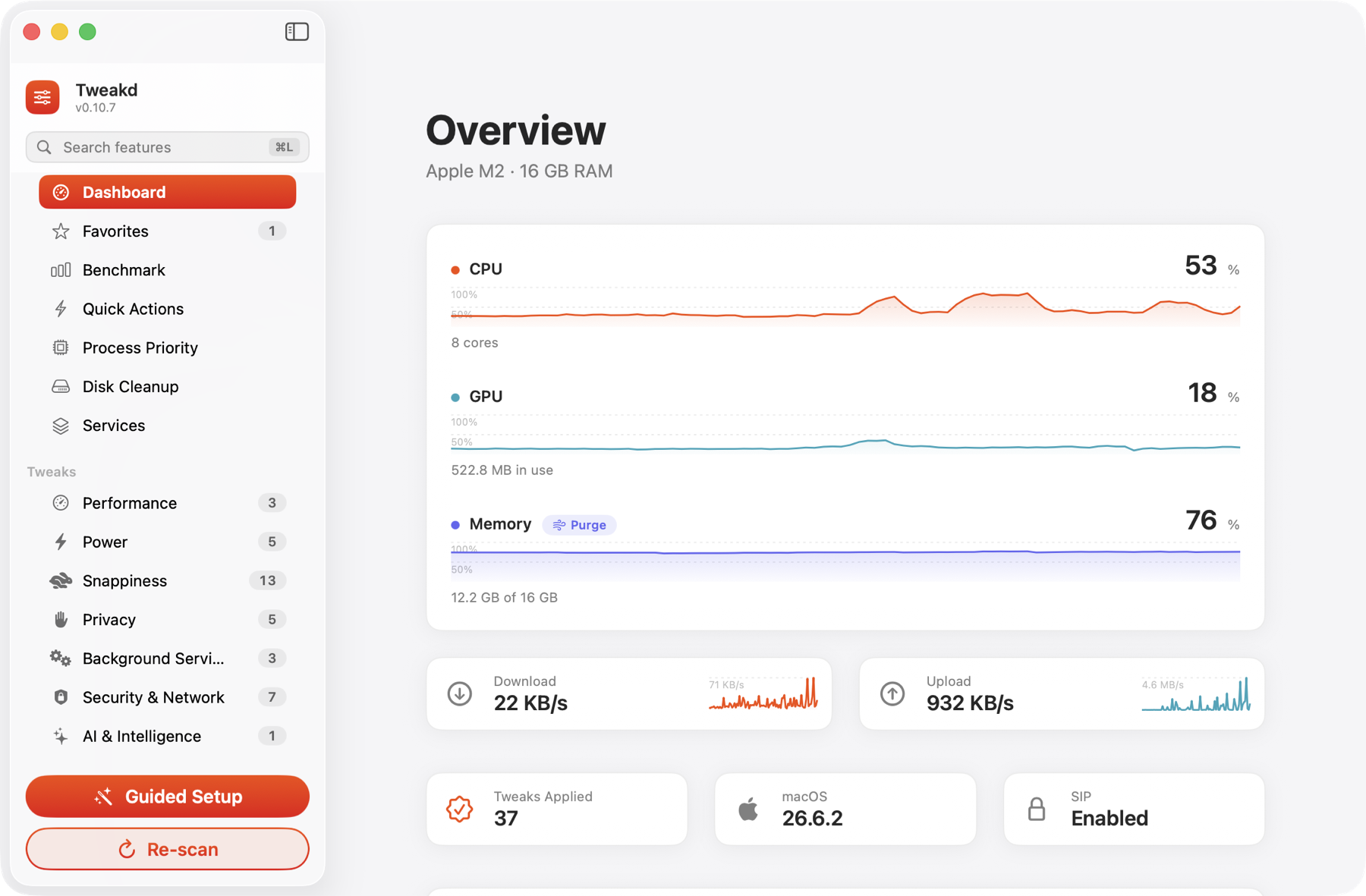
The dashboard, on a real Mac. Every number is read live from the system.
Tune macOS. Or do it entirely by hand.
A premium menu-bar app that toggles reversible system optimizations — live CPU, GPU & RAM, guided setup, one-tap presets. Prefer the Terminal? This page lists every tweak and the exact command to apply and revert it yourself. No app required.
macOS 15+ · Menu bar · Reversible · 51 tweaks + 9 actions
The dashboard, on a real Mac. Every number is read live from the system.
What it does
Tweakd drives the same defaults, pmset, sysctl, launchctl and mdutil commands you'd type yourself — wrapped in a native SwiftUI window, with a live status probe so a tweak only shows Applied when the system really changed.
Performance, Power, Snappiness, Privacy, Background Services, Security & Network, and AI & Intelligence — each with a risk badge and a one-click revert. Process Priority is a separate pane on top.
CPU, GPU and RAM meters read straight from the Mach kernel and the GPU’s own performance counters, each with a 90-second chart, plus a one-tap Clear RAM.
A short wizard asks how you use your Mac and builds a tailored set that never disables what you rely on.
User tweaks run with no prompt; admin tweaks use the native password dialog — no helper tool, no stored password.
Every tweak has a revert. Revert All restores stock in one click, and it can write an emergency Terminal script.
No Dock icon, negligible idle cost — sampling is ref-counted so it costs nothing when no gauge is on screen.
A four-rung ladder — Nominal / Fair / Serious / Critical — each spelling out what it means for you, over a 90-second trend. Unlock admin and it also samples Performance and Efficiency core speeds in MHz, refreshed every second. No degrees: Apple silicon publishes no die temperature to apps, so macOS’s own pressure level is the honest signal.
Clean Up Now clears every safe, regenerable cache in one pass — app caches, DerivedData, simulator and Homebrew/npm/pip caches, thumbnails, crash reports. It lists them before it runs, and it never touches your Trash, Docker data or iOS device backups — those stay one deliberate tap each.
What "Security posture" means in the guided setup. The wizard's second screen asks you to pick Security-Hardened, Balanced or Performance-First, and the three differ in exactly one way: how many of the security tweaks it switches on for you. Balanced, the default, turns on only the ones rated Safe — the ones that harden the firewall and DNS without costing you anything you would notice. Security-Hardened turns on every security tweak, including the ones rated Moderate or Advanced, which do trade a convenience away. Concretely, in System Settings › Network › Firewall: Balanced gets you the firewall itself plus Enable stealth mode, so your Mac stops answering pings; Security-Hardened also switches off both “Automatically allow … to receive incoming connections” options, after which every app — Apple’s included — has to be approved before it can accept an inbound connection. Performance-First turns on none of them, and lets the performance-tagged tweaks win wherever the two disagree. Whichever you choose, the next screen lists every tweak it selected before anything is applied, and each one keeps its one-click revert.
Do it by hand
Should you prefer not to install the application, every optimization it performs remains fully available to you. Open Terminal (Applications → Utilities), paste the Apply command, and press Return; to undo a change, run its Revert command. Tweakd simply automates these very same commands on your behalf.
What the app actually does. Tweakd is essentially an automation layer over the commands on this page. Each toggle just runs the matching Apply or Revert command for you, then re-reads the system to confirm it really changed — nothing is hidden, and nothing is done that you can't type yourself.
The app adds a few conveniences on top — live CPU/GPU/RAM gauges, a thermal-pressure card, a one-tap Disk Cleanup sweep, a guided-setup wizard, one-tap presets, one-click Revert All, and a Core Audio watchdog — but the essential feature, applying and reverting every optimization, is 100% doable straight from the command line, right here. The app just saves you the copy-pasting.
Three things to know before you paste:
① Lines marked sudo need an administrator password — Terminal asks once and the typing stays invisible, that's normal.
② Lines marked SIP off only take effect if System Integrity Protection is disabled (see Safety). Most Macs keep SIP on — skip these.
③ Some UI tweaks restart Dock or Finder (the screen blinks for a second) or ask you to log out and back in to fully take hold.
CPU, GPU and I/O headroom. A couple reset on reboot — reapply after restart if you want them permanent.
Stops the kernel from batching timers. Lower latency, slightly more wakeups.
sudo sysctl -w kern.timer.coalescing_enabled=0sudo sysctl -w kern.timer.coalescing_enabled=1Keeps background apps running at full speed instead of being throttled.
defaults write -g NSAppSleepDisabled -bool YESdefaults delete -g NSAppSleepDisabledLets the GPU use up to ~75% of RAM — great for local ML / heavy graphics. The math reads your total RAM and sets three-quarters of it.
sudo sysctl -w iogpu.wired_limit_mb=$(( $(sysctl -n hw.memsize)/1024/1024*3/4 ))sudo sysctl -w iogpu.wired_limit_mb=0Stops the kernel from throttling low-priority disk work, so background tasks finish faster.
sudo sysctl -w debug.lowpri_throttle_enabled=0sudo sysctl -w debug.lowpri_throttle_enabled=1Biases the scheduler and memory for sustained throughput. Preserves your other boot-args. Takes effect after a reboot.
sudo nvram boot-args="serverperfmode=1 $(nvram boot-args 2>/dev/null | cut -f2-)"sudo nvram -d boot-argsKeep the machine awake and at full tilt on every power source.
Guarantees Low Power Mode stays disabled on battery and adapter.
sudo pmset -a lowpowermode 0sudo pmset -a lowpowermode 1Stops background wake-ups for mail, backups and updates while asleep.
sudo pmset -a powernap 0sudo pmset -a powernap 1Keeps the Mac fully awake and serving when idle on mains. Scoped to the power adapter only — battery behaviour is untouched.
sudo pmset -c sleep 0sudo pmset -c sleep 1Stops storage idling down while on mains, so the first request after a quiet spell isn't slow. Battery behaviour is untouched.
sudo pmset -c disksleep 0sudo pmset -c disksleep 10Blocks the low-power standby state on mains, so the Mac stays instantly reachable over the network.
sudo pmset -c standby 0sudo pmset -c standby 1Frees RAM-sized disk space and speeds sleep. Trade-off: you lose safe-sleep if the battery fully dies.
sudo pmset -a hibernatemode 0sudo pmset -a hibernatemode 3Beta — unverified. Unloads the Touch Bar agent to save a little power and CPU on Touch Bar Macs. Only relevant on a Mac that has a Touch Bar.
launchctl unload -w /System/Library/LaunchAgents/com.apple.touchbar.agent.plistlaunchctl load -w /System/Library/LaunchAgents/com.apple.touchbar.agent.plistBeta — the defaults key is plausible but not verified against a shipping macOS build. Stops the Notification Center widget gallery refreshing widgets in the background.
defaults write com.apple.notificationcenterui bulletinBoardIsBackgroundRefreshEnabled -bool false && killall NotificationCenterdefaults delete com.apple.notificationcenterui bulletinBoardIsBackgroundRefreshEnabled; killall NotificationCenterStrip UI animations and delays. All user-level, safe and reversible — several relaunch Dock or Finder (a one-second blink).
Removes the animation when windows resize.
defaults write -g NSWindowResizeTime -float 0.001defaults delete -g NSWindowResizeTimeTurns off the open/close zoom on windows and dialogs.
defaults write -g NSAutomaticWindowAnimationsEnabled -bool falsedefaults delete -g NSAutomaticWindowAnimationsEnabledRemoves the delay before the Dock slides in and out.
defaults write com.apple.dock autohide-delay -float 0 && defaults write com.apple.dock autohide-time-modifier -float 0.15 && killall Dockdefaults delete com.apple.dock autohide-delay; defaults delete com.apple.dock autohide-time-modifier; killall DockFastest key repeat and shortest delay. Log out and back in to fully apply.
defaults write -g KeyRepeat -int 2 && defaults write -g InitialKeyRepeat -int 15defaults delete -g KeyRepeat; defaults delete -g InitialKeyRepeatRemoves the Mission Control / App Exposé zoom animation.
defaults write com.apple.dock expose-animation-duration -float 0 && killall Dockdefaults delete com.apple.dock expose-animation-duration; killall DockRemoves the delay before the menu bar reveals in fullscreen apps.
defaults write com.apple.dock fullscreen-delay -float 0 && killall Dockdefaults delete com.apple.dock fullscreen-delay; killall DockStep-based scrolling instead of animated. Saves CPU when scrolling heavily.
defaults write -g NSScrollAnimationEnabled -bool falsedefaults delete -g NSScrollAnimationEnabledStops apps from auto-merging windows into tabs. Trims WindowServer work.
defaults write -g AppleWindowTabbingMode -string manualdefaults delete -g AppleWindowTabbingModeCuts WindowServer GPU and RAM use by removing translucency and blur.
defaults write com.apple.universalaccess reduceTransparency -bool truedefaults delete com.apple.universalaccess reduceTransparencyReplaces Spaces / app-switch animations with quick fades. Snappier, less GPU work.
defaults write com.apple.universalaccess reduceMotion -bool truedefaults delete com.apple.universalaccess reduceMotionRemoves Finder's open/copy/resize animations.
defaults write com.apple.finder DisableAllAnimations -bool true && killall Finderdefaults delete com.apple.finder DisableAllAnimations; killall FinderUses the lightweight Scale effect instead of the Genie animation.
defaults write com.apple.dock mineffect -string scale && killall Dockdefaults delete com.apple.dock mineffect; killall DockStops the Dock icon from bouncing while apps open.
defaults write com.apple.dock launchanim -bool false && killall Dockdefaults delete com.apple.dock launchanim; killall DockDisables the ⌘F5 shortcut that pops up “Do you want to turn on VoiceOver?”. VoiceOver itself is untouched — you can still turn it on in System Settings. Symbolic hotkey 59 is rewritten whole, so reverting restores the standard binding.
defaults write com.apple.symbolichotkeys AppleSymbolicHotKeys -dict-add 59 \
  '<dict><key>enabled</key><false/><key>value</key><dict><key>parameters</key><array><integer>65535</integer><integer>96</integer><integer>1048576</integer></array><key>type</key><string>standard</string></dict></dict>' &&
/System/Library/PrivateFrameworks/SystemAdministration.framework/Resources/activateSettings -udefaults write com.apple.symbolichotkeys AppleSymbolicHotKeys -dict-add 59 \
'<dict><key>enabled</key><true/><key>value</key><dict><key>parameters</key><array><integer>65535</integer><integer>96</integer><integer>1048576</integer></array><key>type</key><string>standard</string></dict></dict>' &&
/System/Library/PrivateFrameworks/SystemAdministration.framework/Resources/activateSettings -uCut telemetry from macOS and your browsers. Browser tweaks take effect on the next browser launch.
Stops the "application quit unexpectedly" dialogs.
defaults write com.apple.CrashReporter DialogType nonedefaults delete com.apple.CrashReporter DialogTypeStops Apple Advertising from using your data to target ads.
defaults write com.apple.AdLib allowApplePersonalizedAdvertising -bool falsedefaults write com.apple.AdLib allowApplePersonalizedAdvertising -bool trueTurns off “Share Mac Analytics” and “Share With App Developers” — the same switch as System Settings › Privacy & Security › Analytics & Improvements.
sudo defaults write /Library/Preferences/com.apple.SubmitDiagInfo AutoSubmit -bool false; sudo defaults write /Library/Preferences/com.apple.SubmitDiagInfo ThirdPartyDataSubmit -bool falsesudo defaults write /Library/Preferences/com.apple.SubmitDiagInfo AutoSubmit -bool true; sudo defaults write /Library/Preferences/com.apple.SubmitDiagInfo ThirdPartyDataSubmit -bool trueSets managed-policy flags across Chromium / Chrome / Brave / Edge to stop usage stats, crash reports, URL data collection, search-keystroke and spell-check phone-home. Core Safe Browsing stays on; browsers will show a "managed by your organization" note. Takes effect on browser restart.
for d in org.chromium.Chromium com.google.Chrome com.brave.Browser com.microsoft.Edge; do
  defaults write "$d" MetricsReportingEnabled -bool false
  defaults write "$d" UrlKeyedAnonymizedDataCollectionEnabled -bool false
  defaults write "$d" SafeBrowsingExtendedReportingEnabled -bool false
  defaults write "$d" SearchSuggestEnabled -bool false
  defaults write "$d" SpellCheckServiceEnabled -bool false
donefor d in org.chromium.Chromium com.google.Chrome com.brave.Browser com.microsoft.Edge; do
for k in MetricsReportingEnabled UrlKeyedAnonymizedDataCollectionEnabled SafeBrowsingExtendedReportingEnabled SearchSuggestEnabled SpellCheckServiceEnabled; do
defaults delete "$d" "$k" 2>/dev/null
done
doneWrites a managed user.js into every Firefox profile to turn off telemetry, health-report upload, Shield studies, ping-centre and new-tab data collection. Survives Firefox updates. Replaces any existing user.js in each profile. Takes effect on Firefox restart.
for p in "$HOME/Library/Application Support/Firefox/Profiles/"*/; do
  [ -d "$p" ] || continue
  printf '%s\n' \
    '// tweakd privacy — Firefox telemetry off' \
    'user_pref("toolkit.telemetry.enabled", false);' \
    'user_pref("toolkit.telemetry.unified", false);' \
    'user_pref("toolkit.telemetry.archive.enabled", false);' \
    'user_pref("datareporting.healthreport.uploadEnabled", false);' \
    'user_pref("datareporting.policy.dataSubmissionEnabled", false);' \
    'user_pref("app.shield.optoutstudies.enabled", false);' \
    'user_pref("browser.ping-centre.telemetry", false);' \
    'user_pref("browser.newtabpage.activity-stream.feeds.telemetry", false);' \
    'user_pref("browser.newtabpage.activity-stream.telemetry", false);' \
    'user_pref("browser.discovery.enabled", false);' > "$p/user.js"
donefor p in "$HOME/Library/Application Support/Firefox/Profiles/"*/; do
f="$p/user.js"
[ -f "$f" ] && grep -qE 'tweakd privacy|MacTweak privacy' "$f" && rm -f "$f"
doneQuiet the on-device analysis daemons. The photo/media ones are per-user agents — no SIP needed.
Stops background scanning of photos/videos for objects and scenes (mediaanalysisd).
launchctl disable gui/$(id -u)/com.apple.mediaanalysisd; launchctl bootout gui/$(id -u)/com.apple.mediaanalysisd 2>/dev/null; truelaunchctl enable gui/$(id -u)/com.apple.mediaanalysisdStops face recognition and Memories generation in Photos (photoanalysisd).
launchctl disable gui/$(id -u)/com.apple.photoanalysisd; launchctl bootout gui/$(id -u)/com.apple.photoanalysisd 2>/dev/null; truelaunchctl enable gui/$(id -u)/com.apple.photoanalysisdTurns off filesystem indexing on all volumes. Search still opens apps; it won't find file contents.
sudo mdutil -a -i offsudo mdutil -a -i onBeta — the agent name is the best-known identifier, not verified against a shipping macOS build. Unloads the Dictionary/Lookup background indexing agent.
launchctl unload -w /System/Library/LaunchAgents/com.apple.dictionaryd.plistlaunchctl load -w /System/Library/LaunchAgents/com.apple.dictionaryd.plistPrivacy and throughput on the wire. The two buffer tweaks reset on reboot.
Stops broadcasting services over Bonjour. AirDrop keeps working over AWDL.
sudo defaults write /Library/Preferences/com.apple.mDNSResponder.plist NoMulticastAdvertisements -bool true; sudo killall -HUP mDNSResponder 2>/dev/null; truesudo defaults delete /Library/Preferences/com.apple.mDNSResponder.plist NoMulticastAdvertisements 2>/dev/null; sudo killall -HUP mDNSResponder 2>/dev/null; trueRaises max TCP send/receive buffers to 16 MB for higher throughput on busy local servers.
sudo sysctl -w net.inet.tcp.autorcvbufmax=16777216 net.inet.tcp.autosndbufmax=16777216sudo sysctl -w net.inet.tcp.autorcvbufmax=4194304 net.inet.tcp.autosndbufmax=4194304Raises the max pending-connection queue (somaxconn) from 128 to 1024 so servers accept bursts of connections.
sudo sysctl -w kern.ipc.somaxconn=1024sudo sysctl -w kern.ipc.somaxconn=128Firewall, DNS and kernel-level network tuning. Stop Bonjour Advertising, Enlarge TCP Buffers and Raise Socket Backlog — already covered in Network above — live here too in the app; see that section for their commands.
Turns on the built-in Application Firewall so unsolicited incoming connections are blocked by default.
sudo /usr/libexec/ApplicationFirewall/socketfilterfw --setglobalstate onsudo /usr/libexec/ApplicationFirewall/socketfilterfw --setglobalstate offsudo /usr/libexec/ApplicationFirewall/socketfilterfw --getglobalstateMakes the Mac ignore ICMP ping and unsolicited probe packets instead of answering them. Requires the firewall to already be on.
sudo /usr/libexec/ApplicationFirewall/socketfilterfw --setstealthmode onsudo /usr/libexec/ApplicationFirewall/socketfilterfw --setstealthmode offsudo /usr/libexec/ApplicationFirewall/socketfilterfw --getstealthmodeTurns off both “Automatically allow … to receive incoming connections” switches in System Settings › Network › Firewall — the one for built-in software and the one for downloaded signed software. Every app then has to be approved individually, at the cost of more “Allow incoming connections?” prompts.
Note the Check command prints two lines, one per switch. Both must read DISABLED; flipping either one back on in System Settings undoes half of this.
sudo /usr/libexec/ApplicationFirewall/socketfilterfw --setallowsigned off --setallowsignedapp offsudo /usr/libexec/ApplicationFirewall/socketfilterfw --setallowsigned on --setallowsignedapp onsudo /usr/libexec/ApplicationFirewall/socketfilterfw --getallowsignedPoints DNS at Cloudflare's 1.1.1.1 / 1.0.0.1 privacy resolver instead of your ISP's default. Honest caveat: this is still plaintext DNS — macOS has no command-line switch for encrypted DNS-over-HTTPS/TLS, that requires installing a configuration profile. Applied to every network service — the command below loops over each name from networksetup -listallnetworkservices. Reverting restores your DHCP-provided DNS.
networksetup -listallnetworkservices | tail -n +2 | sed 's/^\* //' |
while IFS= read -r s; do
  sudo networksetup -setdnsservers "$s" 1.1.1.1 1.0.0.1
donenetworksetup -listallnetworkservices | tail -n +2 | sed 's/^\* //' |
while IFS= read -r s; do
sudo networksetup -setdnsservers "$s" Empty
donenetworksetup -listallnetworkservices | tail -n +2 | sed 's/^\* //' |
while IFS= read -r s; do
networksetup -getdnsservers "$s"
doneDownloads the curated StevenBlack ad/tracker/malware list and routes every one of those domains to 0.0.0.0 in /etc/hosts — system-wide, across every browser and app, and pages load faster because the ad requests never happen. Your existing /etc/hosts entries are preserved: only the block fenced by # tweakd-adblock-start / -end is added or removed. Both commands also strip the pre-rename # MacTweak-adblock-* markers, so a Mac that turned this on under the old name is handled too. In the app the list auto-refreshes weekly.
L=$(mktemp); T=$(mktemp)
if curl -fsSL --max-time 30 https://raw.githubusercontent.com/StevenBlack/hosts/master/hosts -o "$L" && [ -s "$L" ]; then
  sed -e '/# tweakd-adblock-start/,/# tweakd-adblock-end/d' \
      -e '/# MacTweak-adblock-start/,/# MacTweak-adblock-end/d' /etc/hosts > "$T"
  echo '# tweakd-adblock-start' >> "$T"
  grep '^0\.0\.0\.0 ' "$L" >> "$T"
  echo '# tweakd-adblock-end' >> "$T"
  sudo cp "$T" /etc/hosts
  sudo dscacheutil -flushcache; sudo killall -HUP mDNSResponder
fi
rm -f "$L" "$T"T=$(mktemp)
sed -e '/# tweakd-adblock-start/,/# tweakd-adblock-end/d' \
-e '/# MacTweak-adblock-start/,/# MacTweak-adblock-end/d' /etc/hosts > "$T"
sudo cp "$T" /etc/hosts
rm -f "$T"
sudo dscacheutil -flushcache; sudo killall -HUP mDNSResponderTurns off IPv6 on all network services, shrinking the attack surface to IPv4 only. Can break IPv6-only networks — check with your ISP first if unsure.
networksetup -listallnetworkservices | tail -n +2 | sed 's/^\* //' |
while IFS= read -r s; do
  sudo networksetup -setv6off "$s"
donenetworksetup -listallnetworkservices | tail -n +2 | sed 's/^\* //' |
while IFS= read -r s; do
sudo networksetup -setv6automatic "$s"
donenetworksetup -listallnetworkservices | tail -n +2 | sed 's/^\* //' |
while IFS= read -r s; do
networksetup -getinfo "$s"
doneRaises the TCP window-scale factor so high-bandwidth, high-latency links (fast Wi-Fi, long-haul VPNs) can keep more data in flight.
sudo sysctl -w net.inet.tcp.win_scale_factor=8sudo sysctl -w net.inet.tcp.win_scale_factor=3sysctl -n net.inet.tcp.win_scale_factorRaises the system-wide and per-process open-file limits, for apps and servers that hit "too many open files" under load.
sudo sysctl -w kern.maxfiles=524288 kern.maxfilesperproc=262144sudo sysctl -w kern.maxfiles=122880 kern.maxfilesperproc=61440sysctl -n kern.maxfilesperprocScheduling priority via renice — a lower nice value means higher CPU priority (range −20…19, default 0). Raise the processes you rely on, or lower the ones you don't.
Gives the DNS/Bonjour resolver daemon scheduling priority, so name lookups and mDNS stay snappy under load.
sudo renice -n -5 -p $(pgrep -f mDNSResponder)sudo renice -n 0 -p $(pgrep -f mDNSResponder)ps -o pid,nice,comm -p $(pgrep -f mDNSResponder)Gives Firefox scheduling priority over background daemons — smoother tab switching and scrolling when the system is busy.
sudo renice -n -5 -p $(pgrep -f "Firefox.app")sudo renice -n 0 -p $(pgrep -f "Firefox.app")ps -o pid,nice,comm -p $(pgrep -f "Firefox.app")Gives Chrome scheduling priority over background daemons.
sudo renice -n -5 -p $(pgrep -f "Google Chrome")sudo renice -n 0 -p $(pgrep -f "Google Chrome")ps -o pid,nice,comm -p $(pgrep -f "Google Chrome")Gives Docker Desktop's processes scheduling priority — fewer stalls in containers while the rest of the system is busy.
sudo renice -n -5 -p $(pgrep -f "com.docker")sudo renice -n 0 -p $(pgrep -f "com.docker")ps -o pid,nice,comm -p $(pgrep -f "com.docker")Gives incoming SSH sessions scheduling priority, so remote terminals stay responsive under local load.
sudo renice -n -5 -p $(pgrep -f "sshd")sudo renice -n 0 -p $(pgrep -f "sshd")ps -o pid,nice,comm -p $(pgrep -f "sshd")Drops mediaanalysisd's scheduling priority so it yields the CPU to whatever you're actively doing.
sudo renice -n 10 -p $(pgrep -f "mediaanalysisd")sudo renice -n 0 -p $(pgrep -f "mediaanalysisd")ps -o pid,nice,comm -p $(pgrep -f "mediaanalysisd")Puts any single process back to the default nice value of 0 — the manual escape hatch for a single PID.
sudo renice -n 0 -p <pid>Because renice resets on reboot, Tweakd's Apply at login option writes a per-target LaunchAgent that waits 15 seconds after login (so the target app has time to launch), then reapplies the same renice through a passwordless sudo rule. Below is the exact plist the app writes for Firefox — replace the label, path and pgrep pattern to build one for another target.
<?xml version="1.0" encoding="UTF-8"?>
<!DOCTYPE plist PUBLIC "-//Apple//DTD PLIST 1.0//EN" "http://www.apple.com/DTDs/PropertyList-1.0.dtd">
<plist version="1.0">
<dict>
    <key>Label</key>
    <string>app.tweakd.priority.firefox</string>
    <key>ProgramArguments</key>
    <array>
        <string>/bin/sh</string>
        <string>-c</string>
        <string>sleep 15; /usr/bin/sudo -n /bin/zsh -c 'renice -n -5 -p $(pgrep -f "Firefox.app")' 2>/dev/null; true</string>
    </array>
    <key>RunAtLoad</key>
    <true/>
</dict>
</plist>launchctl load ~/Library/LaunchAgents/app.tweakd.priority.firefox.plistlaunchctl unload ~/Library/LaunchAgents/app.tweakd.priority.firefox.plist; rm ~/Library/LaunchAgents/app.tweakd.priority.firefox.plistRead before you raise anything below −5. The app caps every priority change at -10 and warns before applying anything more negative than -5 — an overly negative nice value can starve the UI and other apps of CPU time, making the whole Mac feel worse, not better.
Changes made with renice alone reset on reboot; turn on Apply at login above if you want a target to keep its priority across restarts.
Emergency reset: run sudo renice -n 0 on every process you've raised or lowered, then remove any ~/Library/LaunchAgents/app.tweakd.priority.*.plist LaunchAgents you created.
Turn off Siri, proactive suggestions and lookup phone-home. All per-user — no SIP needed.
Boots out the Siri assistant agent (assistantd) and hides its menu bar item.
defaults write com.apple.Siri StatusMenuVisible -bool false; launchctl disable gui/$(id -u)/com.apple.assistantd; launchctl bootout gui/$(id -u)/com.apple.assistantd 2>/dev/null; truedefaults delete com.apple.Siri StatusMenuVisible; launchctl enable gui/$(id -u)/com.apple.assistantdStops duetexpertd — the on-device daemon behind Siri Suggestions and predicted actions.
launchctl disable gui/$(id -u)/com.apple.duetexpertd; launchctl bootout gui/$(id -u)/com.apple.duetexpertd 2>/dev/null; truelaunchctl enable gui/$(id -u)/com.apple.duetexpertdStops sending lookup queries for Siri-powered suggestions.
defaults write com.apple.lookup.shared LookupSuggestionsDisabled -bool truedefaults delete com.apple.lookup.shared LookupSuggestionsDisabledBeta — unverified. Sets OLLAMA_NUM_GPU and OLLAMA_KEEP_ALIVE so local LLM workloads offload more layers to the GPU and keep models resident for 30 minutes instead of unloading between prompts. Restart Ollama after applying.
launchctl setenv OLLAMA_NUM_GPU 999 && launchctl setenv OLLAMA_KEEP_ALIVE 30mlaunchctl unsetenv OLLAMA_NUM_GPU && launchctl unsetenv OLLAMA_KEEP_ALIVENot toggles — run once, on demand. Nothing to revert.
Forces the memory manager to free inactive pages right now (the Dashboard's Clear RAM button).
sudo purgeClears the resolver cache and reloads mDNSResponder.
sudo dscacheutil -flushcache; sudo killall -HUP mDNSResponderRe-downloads the latest StevenBlack list and rebuilds the marked block in /etc/hosts. It only refreshes when Block Ads & Trackers is already on, so a refresh never silently switches blocking on. The app also does this automatically once a week.
if grep -qE '# tweakd-adblock-start|# MacTweak-adblock-start' /etc/hosts; then
  L=$(mktemp); T=$(mktemp)
  curl -fsSL --max-time 30 https://raw.githubusercontent.com/StevenBlack/hosts/master/hosts -o "$L"
  sed -e '/# tweakd-adblock-start/,/# tweakd-adblock-end/d' \
      -e '/# MacTweak-adblock-start/,/# MacTweak-adblock-end/d' /etc/hosts > "$T"
  echo '# tweakd-adblock-start' >> "$T"
  grep '^0\.0\.0\.0 ' "$L" >> "$T"
  echo '# tweakd-adblock-end' >> "$T"
  sudo cp "$T" /etc/hosts
  sudo dscacheutil -flushcache; sudo killall -HUP mDNSResponder
  rm -f "$L" "$T"
else
  echo 'Enable "Block Ads & Trackers" first.'
fiApplies UI tweaks and clears stuck windows.
killall Dock FinderSends a polite terminate to heavy AI/analytics daemons. They may respawn — pair with the toggles above to keep them down.
for p in mediaanalysisd photoanalysisd analyticsd spotlightknowledged knowledgeconstructiond geoanalyticsd; do
  sudo killall -TERM $p 2>/dev/null
doneRestarts coreaudiod to fix stuck audio or runaway CPU. It relaunches automatically; audio blips for a second.
sudo killall coreaudiodErases and rebuilds the Spotlight index for the boot volume. Search is degraded until it finishes.
sudo mdutil -E /Reports the CPU and RAM Docker Desktop's VM is currently allowed to use. Read-only — the limits themselves live in a JSON file whose keys change between Docker versions, so changing them is left to Docker's own Settings → Resources pane.
if command -v docker >/dev/null 2>&1 && docker info >/dev/null 2>&1; then
  docker info --format '{{.NCPU}}|{{.MemTotal}}' |
  awk -F'|' '{printf "Docker Desktop: %s CPUs, %.1f GB RAM allocated.\n", $1, $2/1073741824}'
else
  echo "Docker Desktop isn't running."; open -a Docker
fiLaunches Docker Desktop so you can adjust CPU, memory, swap and disk allocation yourself in Settings → Resources — the safest way to change them.
open -a DockerBefore you start
Everything here is reversible. A few ground rules so nothing surprises you.
Verify any change yourself. Read a current value before and after with the same tools — e.g. defaults read -g NSWindowResizeTime, pmset -g | grep powernap, or sysctl -n kern.ipc.somaxconn. Tweakd does exactly this after every change, which is why it only marks a tweak Applied when the system truly reports the new state.
Prefer the app? Tweakd wraps all of the above with a live status probe, one-tap presets, a guided setup, and a Revert All button. It's a menu-bar app for macOS 15+ — not sandboxed and locally signed, because it drives pmset, mdutil, launchctl and defaults and escalates through the native macOS password prompt.